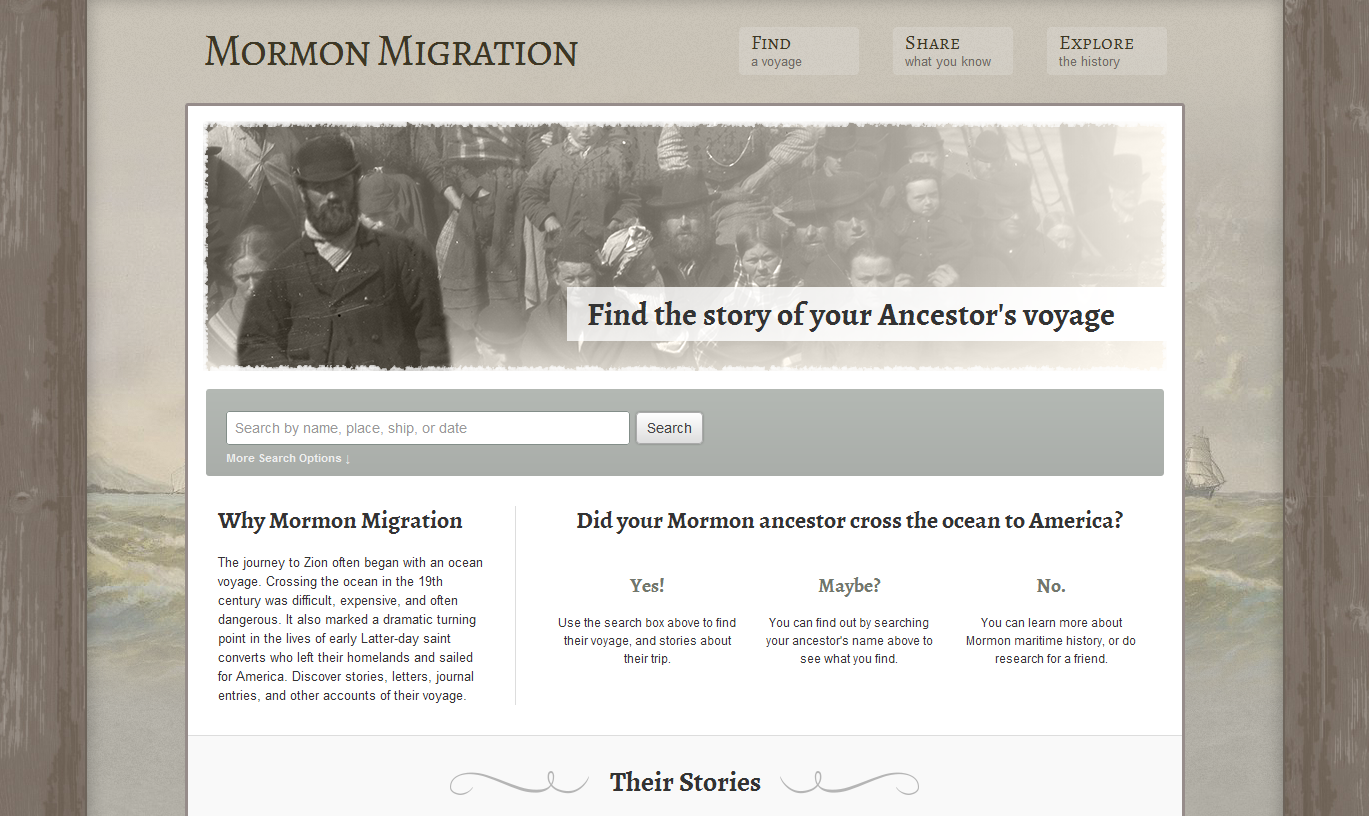
For those with LDS Pioneer ancestors, there are websites to find and share information about your family.
The Mormon Migration website is a "remix" of the old Mormon Migration Index CDs. The data from the old cd's has been added upon and put on the site in an easily searchable format.
You can search by name of person, name of ship, or date. A search for the name "John Kelly" yielded the these results:
You would click on the name of the ship (Camillus, above) to access all available resources about the voyage including personal accounts, passenger lists, and (when you're lucky) images of the ship manifest, as seen below:
Wherever you see blue writing on the site, you can click and learn more. The images of passenger lists are also clickable in order to view them larger. You may have to go through several images in order to find the person you're looking for.
If you have information the Mormon Migration website doesn't, you can submit your information and have it considered as an addition to the database. You would click on "Share what you know about this voyage", as seen in blue italicized writing in the center of the image above.
Go to the site, Mormon Migration, and see what you can learn and share about your Mormon Pioneer ancestors. It's a really easy site to navigate...no pun intended!
Thine in the bonds of happy sailing - Caroleen
Thursday, September 13, 2012
Sunday, June 17, 2012
Free Digitized Newspaper Collections, Part 1
Tips to take full advantage of sites
with digitized newspapers:
- Search the site extensively. You can't get yourself into trouble unless you're downloading something so point and click and see what you can find.
- Look for tabs and sidebars which may lead to more information.
- Take advantage of tutorials and "how to use this site" buttons. Sometimes "?" and and "what's this?" appear at various places on a page. You can click on them and learn more about using the site.
- Make sure you're searching correctly. Watch for correct dates, locations, parts of the newspaper you're searching (ie, advertisements, articles, editorials, headlines, etc.)
Here is a list of some digitized newspaper
collections available to search online:
Online Historical Newspapers Website:
https://sites.google.com/site/onlinenewspapersite/Home
The Olden Times - Historic Newspapers Online:
http://theoldentimes.com
BYU Family History Library Periodicals and Newspapers
(Scroll down to the "Newspapers" section for many links to digitized newspaper collections. Some are indexes but many are fully searchable sites with images of articles. Contact the BYU Family History Library regarding passwords, if needed. Some may be freely available.):
http://lib.byu.edu/sites/familyhistory/periodicals
http://digitalnewspapers.org
Though the Internet is vast, and digitized collections may be elusive, finding your ancestors in free online digitized newspapers is not only possible, but highly likely. Use newspaper sites and creative searches as a start. Use your desire to find your family as your motivation for discovery. Desire is the biggest factor in the finding.
Thine in the bonds of finding your family - Caroleen
The Olden Times - Historic Newspapers Online:
http://theoldentimes.com
BYU Family History Library Periodicals and Newspapers
(Scroll down to the "Newspapers" section for many links to digitized newspaper collections. Some are indexes but many are fully searchable sites with images of articles. Contact the BYU Family History Library regarding passwords, if needed. Some may be freely available.):
http://lib.byu.edu/sites/familyhistory/periodicals
Utah Digital Newspapers:
http://digitalnewspapers.org
Tips to find digitized newspapers
specific to your research:
- Visit the "Chronicling America" website as discussed in a previous blog post on this site. You can learn which newspapers were available in which locations at which time in American History. If you know what you are looking for, it may be easier to locate.
- Use specific words on Google to do your search: Newspaper(s), Historical, Genealogy, County Name, City Name, State Name, Online, etc. I used the words: Grosse Pointe Michigan Genealogy Newspapers. It turned up results that lead me down a winding path to an elaborate collection of digitized newspapers from the ealy 1900's through today.
- Visit state university and college sites to view their digitized holdings. Many have extensive collections.
Though the Internet is vast, and digitized collections may be elusive, finding your ancestors in free online digitized newspapers is not only possible, but highly likely. Use newspaper sites and creative searches as a start. Use your desire to find your family as your motivation for discovery. Desire is the biggest factor in the finding.
Thine in the bonds of finding your family - Caroleen
Thursday, May 31, 2012
US Historic Newspapers Finding Aid - Chronicling America's US Newspaper Directory, 1690-Present
Newspapers are a great resource for family history research. They can help you fill in basic facts about ancestors, but more importantly, newspapers can "add life" to the people in your pedigree.
In order to effectively use newspapers as a resource, you need to know which newspapers were published in the places and times your ancestors were living. Once you know the name of the newspapers, you'll want to see if copies still exist and where they are held. You'll also want to do a search for digitized copies online.
The best resource for finding all newspapers published in the United States since 1690 is "The US Newspaper Directory, 1690-Present" in the Chronicling America section at the Library of Congress website. It is the authority on US newspapers. Here you can find the name of any newspaper published in the US since 1690...before we were even a nation.
*Note that the US Newspaper Directory, 1690-Present is not a list of online newspaper resources. A separate tab on the Chronicling America site will take you to their digitized collection...a subject of a future blog post.
Go to Chronicling America and click on the tab labeled US Newspaper Directory, 1690-Present, as seen in the image below:
After clicking on the US Newspaper Directory, 1690-Present tab, you'll be here:
After choosing a state, county and city (if desired) and a date, you'll be given a list of papers available such as this:
Next, choose one of the papers you'd like more information about. I clicked on The Martin County Herald and got the following page about the paper:
Next I clicked on the "View complete holdings information" under the heading of "Holdings". The results, below, show which issues still exist and at which libraries they can be read. Contact the libraries noted. Some may be available through inter-library loan. Unfortunately, links to digitized collections available online are not given.
Remember,
two valuable purposes of the "US Newspaper Directory, 1690-Present" at Chronicling America on the
Library of Congress website are: First, to tell you the location, dates of
publication, and the names of newspapers published in the US since 1690.
Second, to tell you the repository of the newspapers and the issues available.
Thine in
the bonds of learning more than names and dates. – Caroleen
PS - Though most
of the
newspapers in the US have not been digitized and will take a lot of
effort to
find and read, it wouldn't hurt to search for a digitized copy online. But even
if you can't find newspaper articles about your ancestors the easy way,
the effort you put into tracking down newspapers through the Chronicling America website will be well worth it when you discover something new.
Saturday, April 7, 2012
Source Writing - Don't Let It Scare You!
In the first months of learning how to research my family history, I felt paralyzed by the prospect of writing correct source citations. I wanted to do it right, and the thought of making a mistake kept me from doing anything. I overcame this unfounded fear and have advice for those experiencing similar feelings of anxiety.
2. The purpose of a citation is to get back to the source you are citing. If you can do that, your citation is a success.
3. Attach the information necessary for a source citation to every image you download, print, copy, photograph. You don't want to try to figure out later where you got it.
4. To make source writing easy, use the templates in the most current release of your favorite genealogy database programs. (Rootsmagic and Legacy both attempt to closely follow the standards found in Elizabeth Shown Mill's books Evidence! and Evidence Explained.)
5. In the absence of a template, write down everything you can about your source. You can worry about formatting later.
6. If you want to be professional in your source writing, follow the established and current genealogical standards.
7. Remember that the most correctly written citation does not establish proof. Evaluation of the quality of a source and it's application to the fact you're trying to document could be the subject of a whole other blog post.
Click on the following links for articles, blog posts, and books about source writing:
The Genealogy Source Citation Quick Reference Card - Thomas McEntee
Evidence Explained - The Book - Elizabeth Shown Mills
Evidence Explained - The Website - Elizabeth Shown Mills
The BCG Genealogical Standards Manual (2000) - Board for Certification of Genealogists
Genealogical Standards of Evidence: A Guide for Family Historians - A book by Brenda Dougall Merriman reviewed by Olive Tree Genealogy
An Extensive List of Blog Posts about Citing Sources- Michael Hait blog author of Planting the Seeds
Don't let source writing make you nervous. If you want to do it correctly, there are plenty of resources available to teach you how. If you've been able to find elusive records, you're most certainly able to format a citation. Just like with your research, it all depends on how badly you want it.
Thine in the bonds of wanting it! Caroleen
Saturday, March 31, 2012
Create an Online Genealogical Survey to Capture the Interest of Your Family
Asking your relatives a lot of questions to aid your genealogical research can be an overwhelming, tedious or boring experience for them. What if you created a colorful survey to capture their interest and enthusiasm?
Google Docs will allow you to create an online survey that is so fun to fill out, your family will be asking you to send them another.
Here's how to do it:
Go to docs.google.com
Sign in or Create an Account and then click on the red "Create" button.
From there a dropdown box appears where you will click on "Form".
When you click on "Form" you'll be brought to the page where you write your survey:
After filling in the survey form, you can share it with the people you want to fill it out. Click on the Google+ share button to share it with your Google+ Circles. Click on "Email this form" to send it to people through email. Be sure to UNcheck the "Include form in this email" if you want people to see the pretty background as they fill out your survey.
This is what the email looks like when you send it to someone:
If they click on the link, they'll see a survey like this:
When you go back to your Google Docs, you'll see the survey you created in your list of documents.
Click on it to be brought to a spreadsheet of responses to your survey.
The answers your respondents give will be in the spreadsheet. You have all their answers in one place!
From the spreadsheet you can also edit your form or view it live by clicking on "Form" at the top.
If you'd like to see the Family History Photo Survey I created, CLICK HERE.
You may find survey making has other useful applications, too. I used it to find out what kind of Easter treats my family want this year. (We're at 17 descendants and still counting so holidays are getting a bit more complicated!) If you want to see it, Click Here to see the Easter Treat Survey. You can fill it out, but I can't guarantee you'll get a treat!
Now try making a survey yourself!
Thine in the bonds of family history fun! Caroleen
Saturday, March 24, 2012
Blogs - They're not just for reading...
![]() | |
| This is the symbol for Blogger, a blog hosting service offered by Google. |
Ever thought about starting your own blog?
Here are some good reasons to do it:
1. Just like you can learn a lot by reading others' blogs, others can learn a lot by reading a blog hosted by you. Be a giver of information!
2. Blogs are an easy way to get started using the cloud. The data you upload to a blog is saved in "the cloud". Who knew?!
3. A blog is a cheap (as in free!) way to back up your data. Everything you put on the blog is backed up by whatever blog hosting service you use.
4. Sharing your family history finds on a blog gets the info to interested family members quickly. Find it, post it - it's that easy. Forget the photocopies! Eradicate the emails! Lose the links! It's all on the blog for whomever wants it. They can print the images and documents you post or they can save it to their own computer.
Following are a couple examples of using
a blog to share family history information.
The first blog holds images from a scrapbook. Sharing the scrapbook on a blog has several advantages over printing books for family members. One, it's free; two, it can be shared widely; three, it can be printed or downloaded by others...saving you time; and four, distant cousins (whom you may not even know) can find it on the web.

The second blog holds documents and images. It's organized more like a file cabinet of information than like a scrapbook. Viewers can download or print anything from the blog.
Watch these short videos about
how to create a blog on Blogger:
Blog your Family History Part 1
(Click on "YouTube" at the bottom of the screen to
watch it on YouTube with a larger screen.)
Blog Your Family History Part 2
(Click on "YouTube" at the bottom of the screen to
watch it on YouTube with a larger screen.)
Blog Your Family History Part 3
(Click on "YouTube" at the bottom of the screen to
watch it on YouTube with a larger screen.)
Now go share your family history with your own blog!
Thine in the bonds of family history fun! Caroleen
Wednesday, March 21, 2012
Dropbox - A Virtual Flash Drive
As great as a flash drive is for storing and easily moving your data, Dropbox is even better. Dropbox is a cloud based data storage site with benefits far beyond the basic storage a flash drive can deliver.
Reasons to Use Dropbox
1. Unlike a flash drive, you can't forget to take your Dropbox with you. You can't drop it in a sink, a puddle, or a bowl of soup. You can't step on it, drive over it, or mow it with your lawn mover. In other words...since you can't physically hold it, you can't physically lose it.
2. Your Dropbox can be accessed from any computer you've installed it on. If you're not connected to the Internet when you access your Dropbox, it will be synced to all your devices next time you're online.
3. Your Dropbox can be accessed from any computer that's connected to the Internet, whether or not Dropbox is installed on that computer. Just go to Dropbox.com and sign in to your account.
4. Dropbox has an app for iPhone, Android and Blackberry. You can access your files on the go!
5. Dropbox allows you to share folders with others who can collaborate with you and edit files. No more emailing files to others and getting lost in multiple revisions.
6. A "Public" folder is available on your Dropbox which enables the sharing of files or folders without allowing edits or alterations.
7. A "Photos" folder is available on your Dropbox for sharing images with others by way of a unique link. They can only see the images you allow them to access.
Are you convinced? It's time to get started.
Go to the Dropbox website and watch the demo. Then download it to your computer and create an account.
Just about anything you need to learn about Dropbox can easily be found in videos at YouTube. Some users of Dropbox upload videos to YouTube (usually just out of the goodness of their hearts) in order to help others learn more about the service. Some are more professional than others, and some are in languages other than English, but you're sure to find a few that are beneficial to you.
Go to YouTube (click here) and search topics such as "using Dropbox" or "Dropbox tutorials".
Just about anything you need to learn about Dropbox can easily be found in videos at YouTube. Some users of Dropbox upload videos to YouTube (usually just out of the goodness of their hearts) in order to help others learn more about the service. Some are more professional than others, and some are in languages other than English, but you're sure to find a few that are beneficial to you.
Go to YouTube (click here) and search topics such as "using Dropbox" or "Dropbox tutorials".
Watch for further posts on FHClassNotes about specific features of Dropbox that are beneficial to your efforts in genealogy.
- Caroleen
Subscribe to:
Posts (Atom)


